








Neon
Case and Image Data Software
Neon represents the next generation of case and imaging management software made by MetaSystems.
Neon is the interface for case and image data organization installed with all Ikaros and Metafer installations. MetaSystems solutions are designed to address particular imaging and image analysis tasks. Neon collects the data from any imaging job and also from external sources and presents them in a comprehensive and versatile case management dashboard. Hence, Neon always has the most relevant information for the user at hand; fast, secure, and no matter from where the information originates. Strong data management algorithms, several convenient display modes, and many options for selecting and filtering content make Neon the perfect basis to organize large quantities of heterogeneous information.
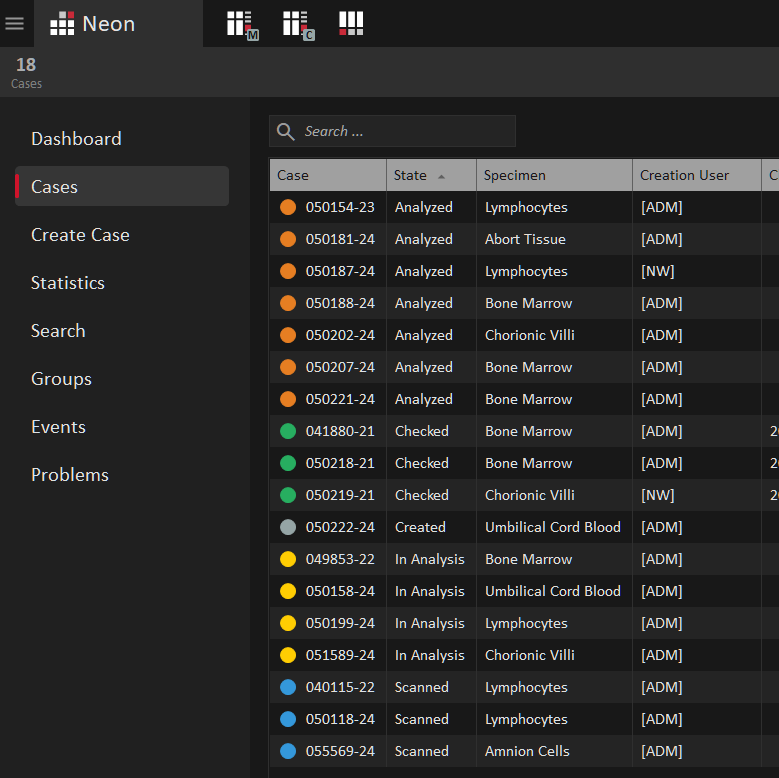
Neon gathers case data from external sources and displays it alongside with Ikaros and Metafer data and images in the Case List window, a customizable, user-friendly interface. Cases in the selected data folder are shown in a configurable table. Colored labels indicate each case’s current workflow state, and additional data fields can be added as sortable columns, making all relevant information immediately accessible when launching Neon.
Various cross-case views can be accessed through the tab bar located on the left side of the Neon window. These views offer comprehensive data summaries, featuring statistical queries, advanced case searches, case grouping options, and tools for identifying and resolving data integrity issues. Neon users can define custom data filters, easily accessible from the filter bar above the case table. The case list can then be refined using criteria such as users, workflow states, creation dates, groups, or any other available data fields. Users can benefit from a default filter tailored to their group, ensuring they see only the cases most relevant to their work.
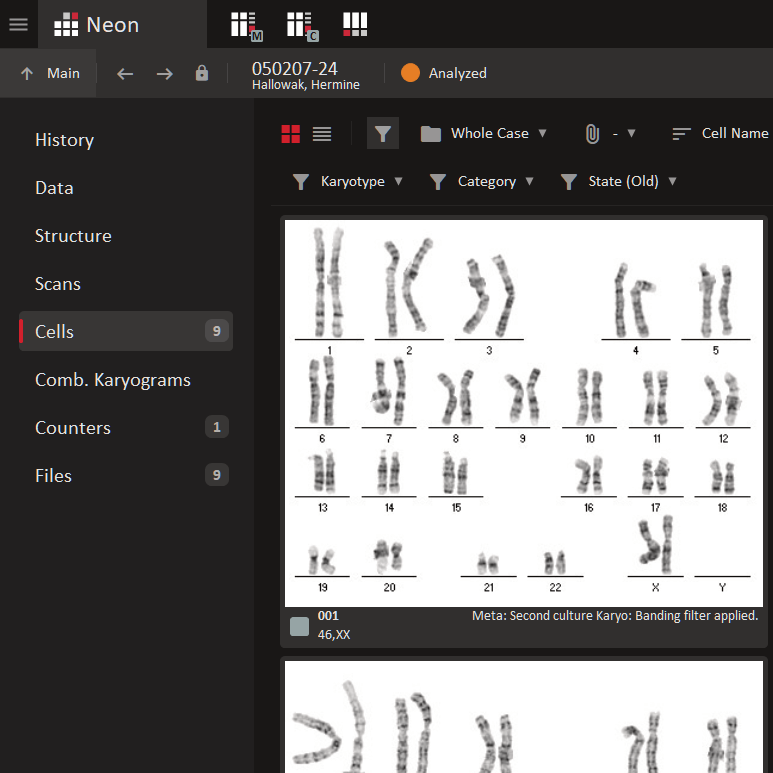
In the Case View window, all relevant case information is accessible through the case view tabs, presenting details such as the number of available Metafer scans, digital slide images, and cells. From this area, users can also create and organize combined karyograms, counters, and any attached external files. The cell gallery serves as the central image repository for each case, with a configurable footer displaying details such as remarks, coordinates, and karyotypes. Square-shaped flags indicate the workflow status of each cell, providing a clear overview of progress.
With just a few clicks, users can customize the gallery display, for example by showing only the karyograms, adjusting image sizes, or setting the magnification level. Separately, the gallery configuration allows you to control which data appears below the images and whether to show the cell workflow status or a user defined category. The handy button bar on the right offers quick access to image management functions, including opening images in Ikaros, viewing and editing image data, and moving or deleting images. Neon’s user administration ensures that only authorized personnel can carry out critical actions.
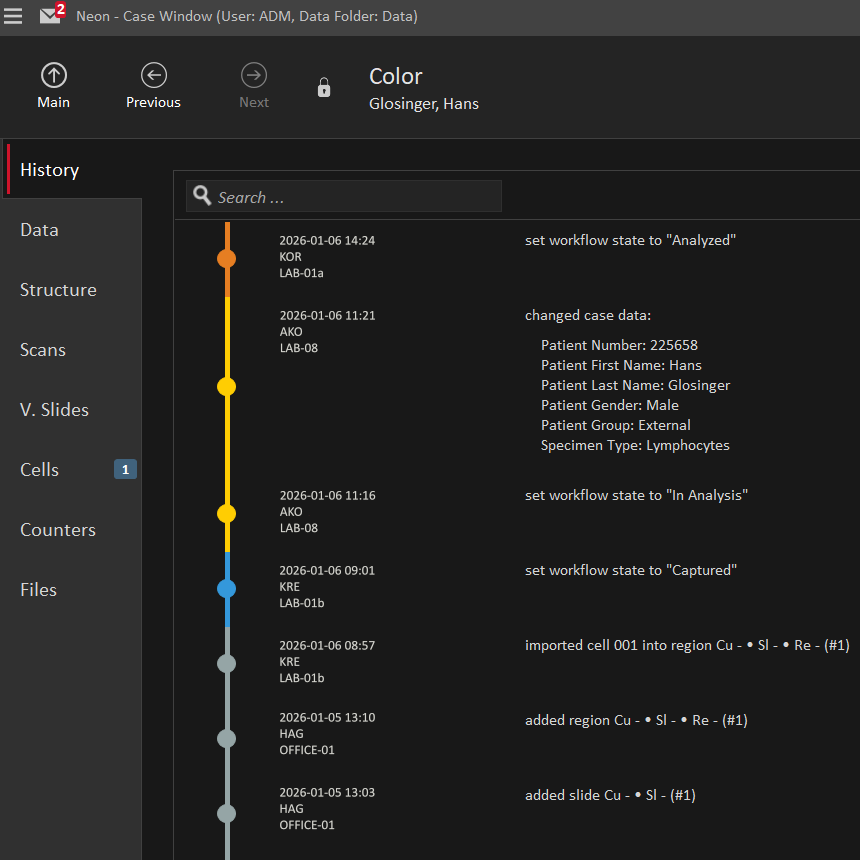
Neon provides a comprehensive view and monitoring of all aspects of the laboratory’s entire routine workflow. Color-coded markers assist users in tracking case statuses. Workflow configurations can be customized and automated, with the option for recording specialized and optional steps using sub-workflows.
Neon boasts a reporting function accompanied by a user-friendly graphical report template editor. This feature empowers users to create visually appealing and informative reports tailored to their specific needs. In addition, Neon includes a statistical query module for generating detailed summaries of large case collections.
Following strict data security standards, Neon protects sensitive content, such as patient records, granting access only to authorized personnel. With its flexible and robust workflow configurations, Neon fits smoothly into existing processes. As an accessory for Ikaros and for Metafer, it works seamlessly with MetaSystems’ full range of imaging installations and customization packages.
Neon features a robust multi-level permissions management system, allowing precise tuning of access rights for user groups and roles. This ensures users have the right access to necessary information and functions.
Neon documents all processing steps and configuration changes in case history entries and audit trails, ensuring complete traceability.
Neon serves as general data management software.